UI / UX Design
Pocketpal
Nurturing Financial Independence in Every Child.
Year :
2024
Industry :
Fintech and Family
Project Duration :
8 months

About Pocketpal
PocketPal is an educational family app offered to families to empower children aged 6-16 with essential personal finance skills. We provide the knowledge and tools needed for children to navigate financial concepts, including saving, spending, and earning, all under the supervision of their parents.
Unfolding the problem space
Parents of young children need a way to introduce financial concepts in a playful manner because traditional banking methods may not capture the interest of children since they often find money abstract and challenging to understand.
Goal 01
Addressing a crucial gap in the financial sector by specifically catering to an underserved market.
Goal 02
Make financial education accessible to all, by providing knowledge and tools to navigate the financial landscape.
Goal 03
Educate children and young individuals about financial concepts from an early age, equipping them with essential knowledge and skills


Research
How Are Our Competitors Shaping the Landscape?
The U.S. and UK have several child-focused finance apps like GoHenry and Greenlight, but Europe’s market remains relatively untapped. In Belgium, traditional banks like KBC, ING and BNP Paribas Fortis dominate the market, offering basic child accounts with limited interactive or educational features.
I created an online survey and conducted interviews to gather key insights.
IDEATION
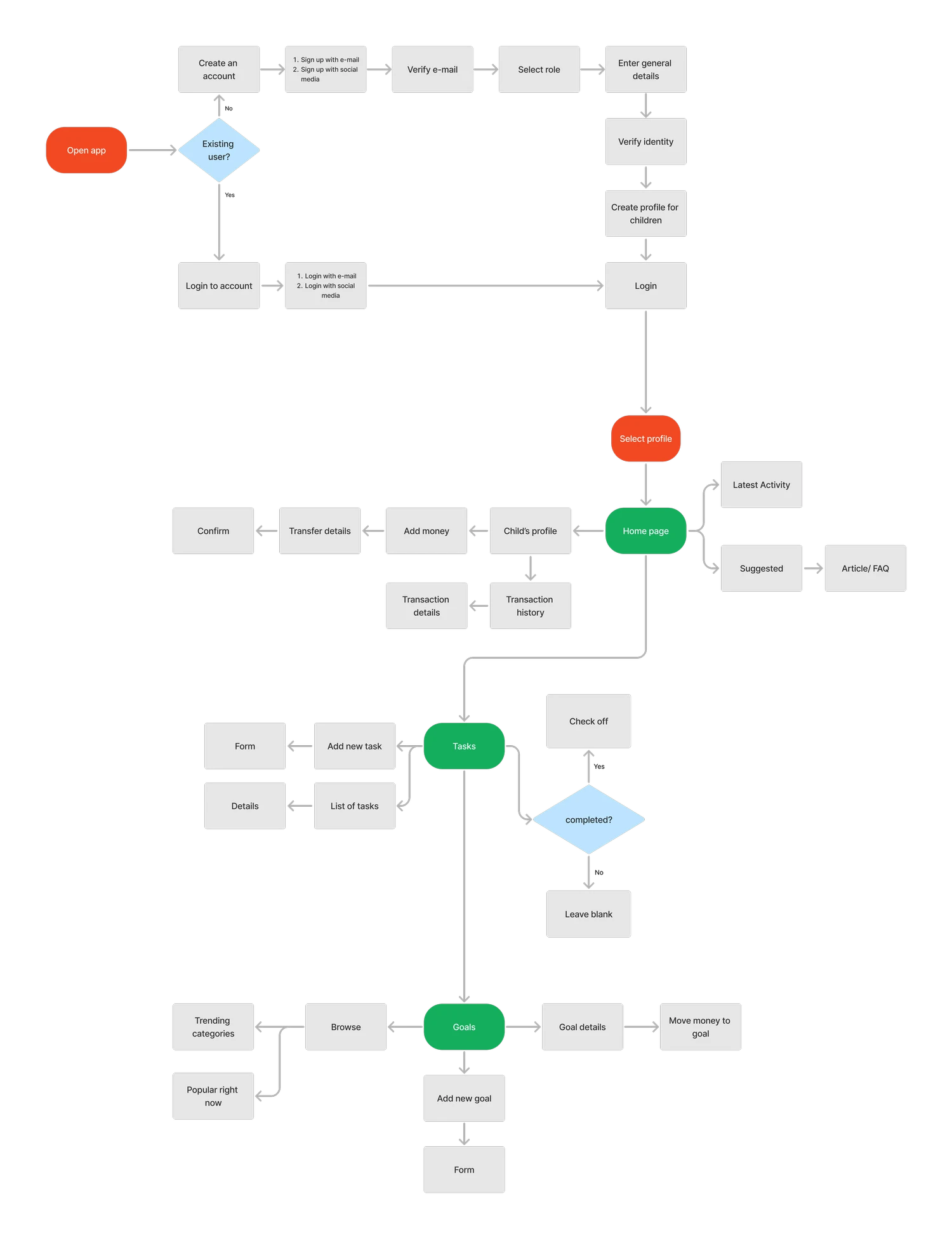
After having defined the features of the app, I created flows for the main tasks.
Testing
Moderated Usability Tests
After testing the functioning prototype with users, I've identified 4 main usability issues.
01
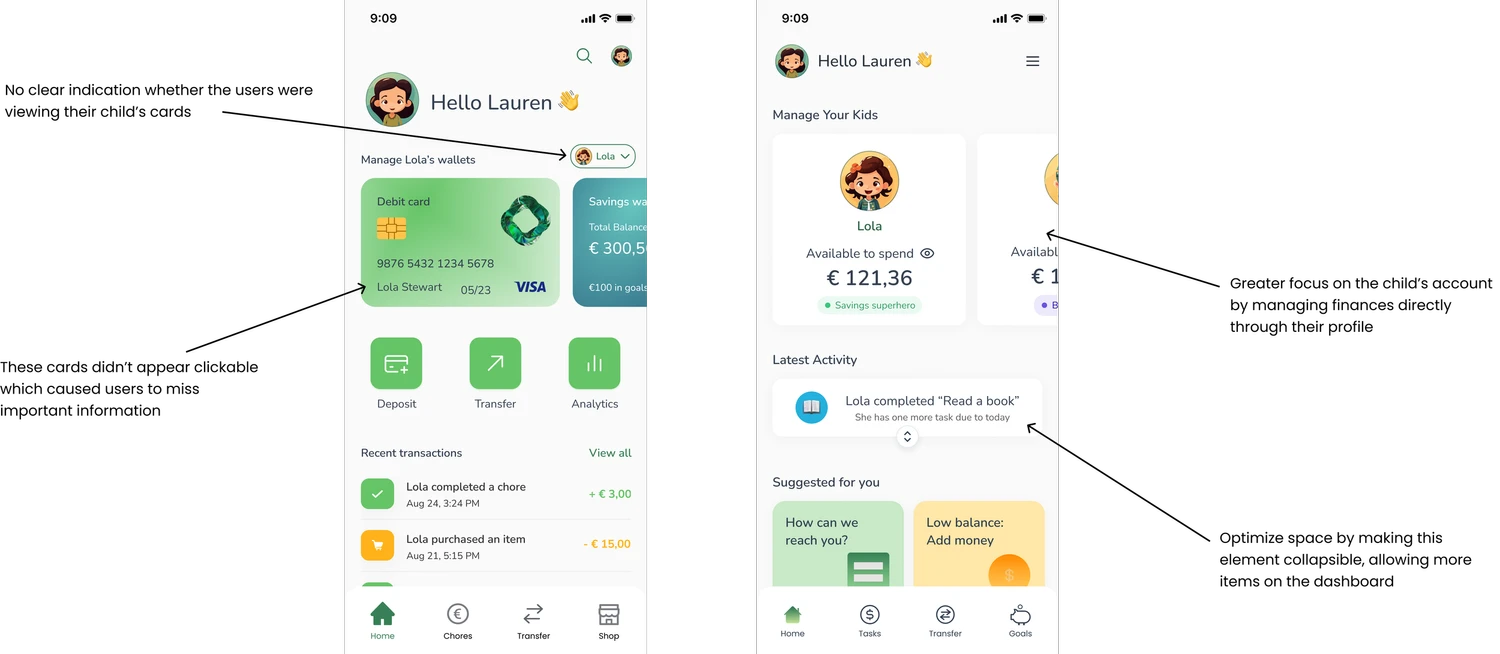
Cards on the home screen weren't recognized as clickable elements, leading to unnecessary clicks and delays in completing the tasks.
02
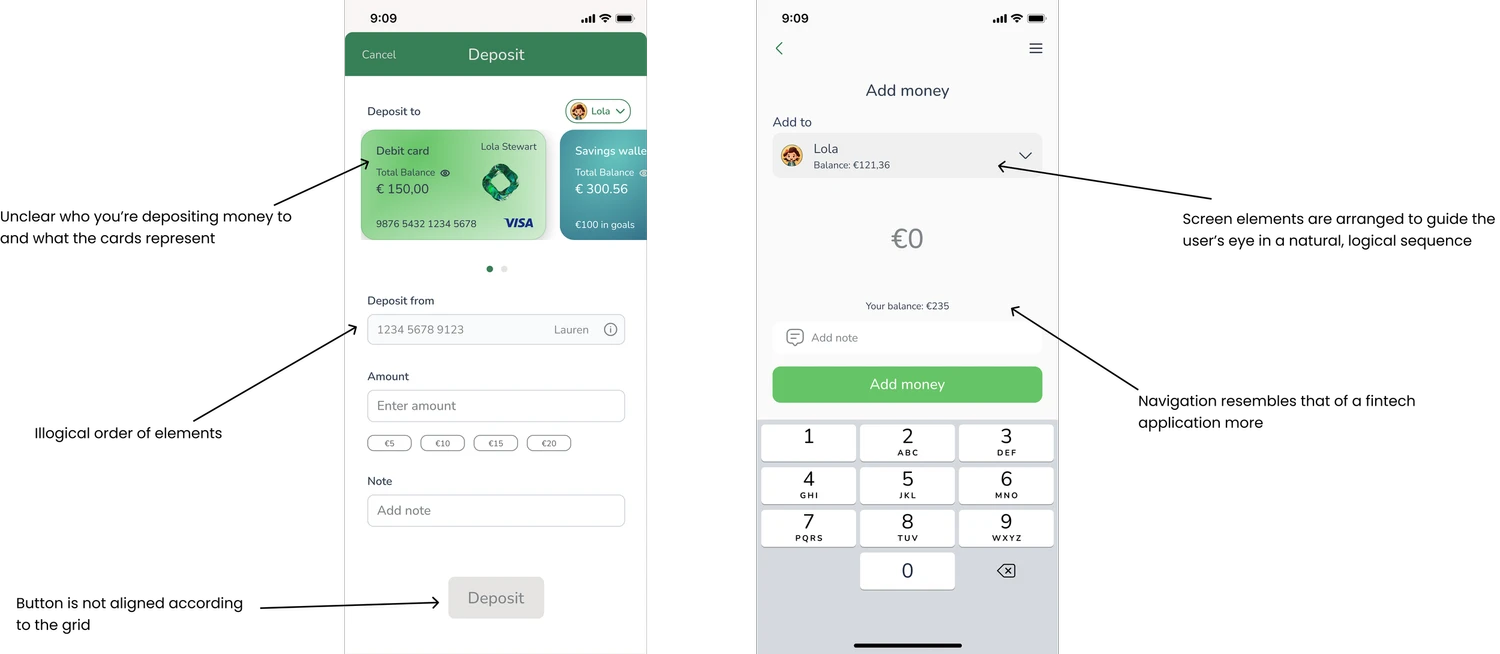
No clear distinction between the transfer feature and the depositing feature.
03
The savings goals should be more intuitive and easier to locate, given its significance.
04
The parent's remaining balance should be placed in a location that aligns with user expectations.
Pivoting the designs
After conducting usability tests, I refined the designs through an iteration cycle, addressing the key issues I identified.
Takeaways
Challenges
Lack of imageries - small variety of illustrations in a consistent style.
“Learn as I go” - my first UX/UI project, where I was still exploring and understanding the field.
Started with an open source design system but they lacked many essential elements so ended up creating my own.
What I learned
Prioritizing users and their perspectives over personal assumptions.
Actively seek user feedback to validate and refine design decisions.
Enhanced skills in creating interactive prototypes resembling final products.
Maintain consistency using a design system.
More Projects


UI / UX Design
Pocketpal
Nurturing Financial Independence in Every Child.
Year :
2024
Industry :
Fintech and Family
Project Duration :
8 months
About Pocketpal
PocketPal is an educational family app offered to families to empower children aged 6-16 with essential personal finance skills. We provide the knowledge and tools needed for children to navigate financial concepts, including saving, spending, and earning, all under the supervision of their parents.
Unfolding the problem space
Parents of young children need a way to introduce financial concepts in a playful manner because traditional banking methods may not capture the interest of children since they often find money abstract and challenging to understand.
Goal 01
Addressing a crucial gap in the financial sector by specifically catering to an underserved market.
Goal 02
Make financial education accessible to all, by providing knowledge and tools to navigate the financial landscape.
Goal 03
Educate children and young individuals about financial concepts from an early age, equipping them with essential knowledge and skills
Research
How Are Our Competitors Shaping the Landscape?
The U.S. and UK have several child-focused finance apps like GoHenry and Greenlight, but Europe’s market remains relatively untapped. In Belgium, traditional banks like KBC, ING and BNP Paribas Fortis dominate the market, offering basic child accounts with limited interactive or educational features.
I created an online survey and conducted interviews to gather key insights.
IDEATION
After having defined the features of the app, I created flows for the main tasks.
Testing
Moderated Usability Tests
After testing the functioning prototype with users, I've identified 4 main usability issues.
01
Cards on the home screen weren't recognized as clickable elements, leading to unnecessary clicks and delays in completing the tasks.
02
No clear distinction between the transfer feature and the depositing feature.
03
The savings goals should be more intuitive and easier to locate, given its significance.
04
The parent's remaining balance should be placed in a location that aligns with user expectations.
Pivoting the designs
After conducting usability tests, I refined the designs through an iteration cycle, addressing the key issues I identified.
Takeaways
Challenges
Lack of imageries - small variety of illustrations in a consistent style.
“Learn as I go” - my first UX/UI project, where I was still exploring and understanding the field.
Started with an open source design system but they lacked many essential elements so ended up creating my own.
What I learned
Prioritizing users and their perspectives over personal assumptions.
Actively seek user feedback to validate and refine design decisions.
Enhanced skills in creating interactive prototypes resembling final products.
Maintain consistency using a design system.
More Projects
UI / UX Design
Pocketpal
Nurturing Financial Independence in Every Child.
Year :
2024
Industry :
Fintech and Family
Project Duration :
8 months
About Pocketpal
PocketPal is an educational family app offered to families to empower children aged 6-16 with essential personal finance skills. We provide the knowledge and tools needed for children to navigate financial concepts, including saving, spending, and earning, all under the supervision of their parents.
Unfolding the problem space
Parents of young children need a way to introduce financial concepts in a playful manner because traditional banking methods may not capture the interest of children since they often find money abstract and challenging to understand.
Goal 01
Addressing a crucial gap in the financial sector by specifically catering to an underserved market.
Goal 02
Make financial education accessible to all, by providing knowledge and tools to navigate the financial landscape.
Goal 03
Educate children and young individuals about financial concepts from an early age, equipping them with essential knowledge and skills
Research
How Are Our Competitors Shaping the Landscape?
The U.S. and UK have several child-focused finance apps like GoHenry and Greenlight, but Europe’s market remains relatively untapped. In Belgium, traditional banks like KBC, ING and BNP Paribas Fortis dominate the market, offering basic child accounts with limited interactive or educational features.
I created an online survey and conducted interviews to gather key insights.
IDEATION
After having defined the features of the app, I created flows for the main tasks.
Testing
Moderated Usability Tests
After testing the functioning prototype with users, I've identified 4 main usability issues.
01
Cards on the home screen weren't recognized as clickable elements, leading to unnecessary clicks and delays in completing the tasks.
02
No clear distinction between the transfer feature and the depositing feature.
03
The savings goals should be more intuitive and easier to locate, given its significance.
04
The parent's remaining balance should be placed in a location that aligns with user expectations.
Pivoting the designs
After conducting usability tests, I refined the designs through an iteration cycle, addressing the key issues I identified.
Takeaways
Challenges
Lack of imageries - small variety of illustrations in a consistent style.
“Learn as I go” - my first UX/UI project, where I was still exploring and understanding the field.
Started with an open source design system but they lacked many essential elements so ended up creating my own.
What I learned
Prioritizing users and their perspectives over personal assumptions.
Actively seek user feedback to validate and refine design decisions.
Enhanced skills in creating interactive prototypes resembling final products.
Maintain consistency using a design system.